
Download YoutubeVideoDescargas – youtube video downloader, free video download, download youtube videos, mp4, mpeg, batch download, android app, utility tool, productivity app
Overview
YoutubeVideoDescargas is a productivity-focused mobile application designed to streamline the process of downloading videos from YouTube. Its primary purpose is to provide users with a straightforward method to save content for offline viewing, addressing the common need for access to videos without an internet connection. The app targets individuals who frequently consume YouTube content and require a reliable, efficient tool to manage downloads.
This includes students, content researchers, educators, and casual viewers who value convenience and control over their digital media. The application operates as a utility tool, enhancing the functionality of smartphones by enabling offline access to video material. Although the developer did not provide additional background on the organization behind the app, its long-standing presence since 2007 suggests a stable and established service.
The app’s relevance in the mobile ecosystem lies in its niche focus on video downloading—a persistent user need in a world where streaming data usage and connectivity limitations remain challenges. By allowing users to batch download videos and convert them directly to MPEG format, YoutubeVideoDescargas adds tangible value to the user’s content management workflow.
Key Features & Functionality
- Massive Download Capacity: The app supports batch downloads, allowing users to input multiple YouTube URLs simultaneously. This feature is ideal for users who need to collect large volumes of educational or entertainment content at once, significantly reducing manual effort and time.
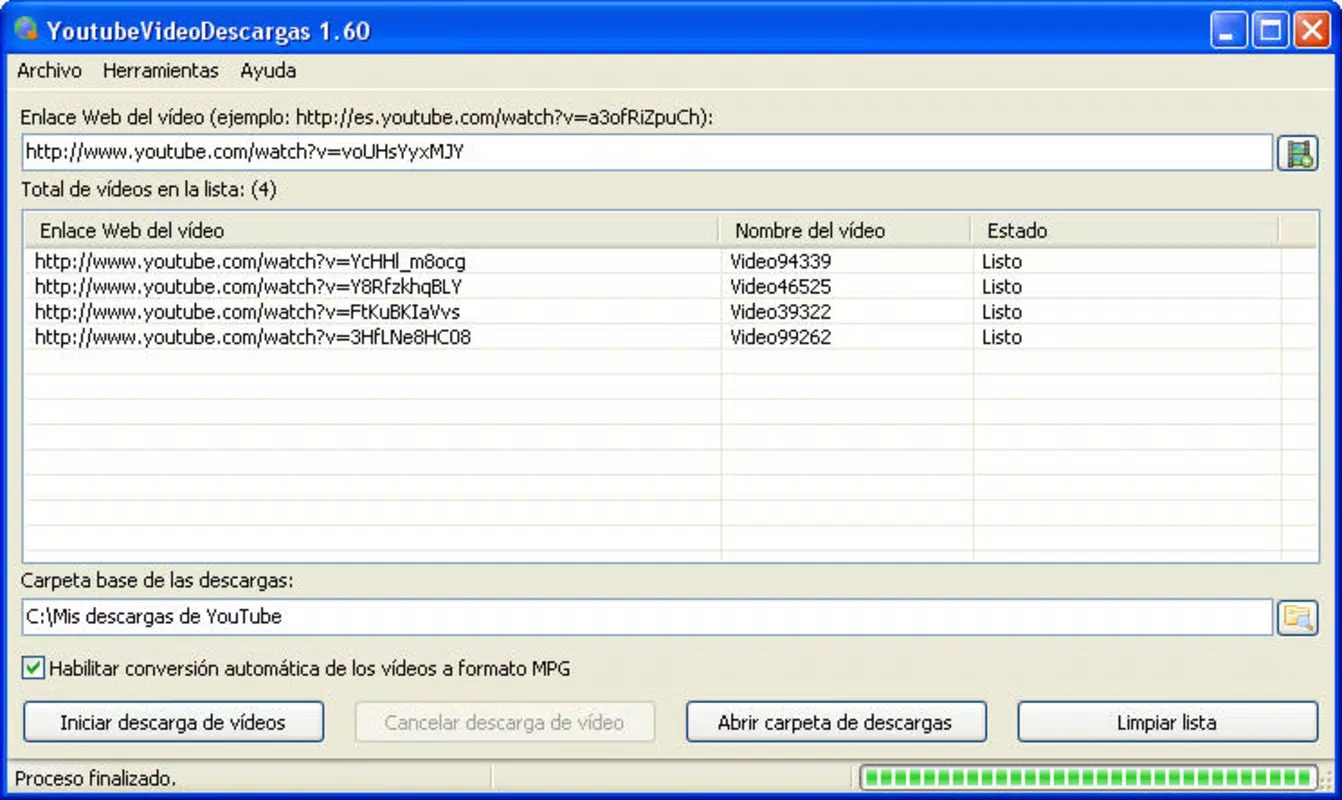
- User-Friendly Interface: Featuring a simple text input field for video URLs, the interface is designed for accessibility across all user levels. Even users with minimal technical experience can navigate the app with ease, making it suitable for a broad audience.
- Direct Conversion to MPEG: After downloading, videos are automatically converted to MPEG format. This eliminates the need for third-party conversion tools, simplifying the workflow and ensuring compatibility with a wide range of media players and devices.
- Free to Use: The application is available at no cost, making it an accessible solution for budget-conscious users. This pricing model enhances its appeal as a utility tool without financial barriers.
For example, a student preparing for an exam might use the batch download feature to collect multiple tutorial videos from YouTube, then convert them to MPEG for playback on a portable device during commutes. Similarly, a content curator could use the app to gather clips for offline review or editing. These real-world applications highlight the app’s practical utility in daily digital workflows.
Interface, UX & Performance
The user interface of YoutubeVideoDescargas is minimalistic and focused on core functionality. The layout centers around a single input field for YouTube URLs, complemented by a clear download button. Navigation is intuitive, with no complex menus or hidden options, reducing cognitive load and enhancing usability.
The visual design is functional rather than decorative, prioritizing clarity and speed. Although the developer did not list formal performance metrics, the app’s lightweight size of 2.3 MB suggests efficient resource usage. It is likely to operate smoothly on a wide range of Android devices, including older models.
Responsiveness appears to be consistent, as the app handles multiple URL entries without noticeable lag. Stability is implied by its long availability since 2007, indicating a reliable track record. However, specific details about battery consumption, background processing, or compatibility with newer Android versions were not disclosed.
Overall, the UX emphasizes simplicity and efficiency, aligning with the app’s purpose as a no-frills productivity utility.
Platform Compatibility & Technical Requirements
YoutubeVideoDescargas is available exclusively on the Android platform. The app requires Android as the operating system, though specific minimum OS version and hardware requirements were not listed. The file size is 2.3 MB, indicating a lightweight installation that minimizes storage impact.
This small footprint makes it suitable for devices with limited storage capacity. The latest version is 1.0, which may suggest a stable release with minimal updates over time. While the developer did not specify compatibility with newer Android versions or API levels, the app’s continued availability implies ongoing support.
Users should exercise caution when installing on modern devices, as older apps may face security or functionality limitations. For optimal performance, it is recommended to verify device compatibility and ensure the operating system meets the app’s unlisted requirements.
Pros and Cons
Pros
- Free to use with no hidden costs or in-app purchases
- Supports batch downloads for efficient content collection
- Direct conversion to MPEG format eliminates the need for external tools
- Simple, intuitive interface suitable for all user levels
- Lightweight size (2.3 MB) ensures minimal storage usage
Cons
- Developer did not provide specific OS version requirements
- Compatibility with modern Android versions is uncertain
- No information on update frequency or long-term support
- Security and permissions were not disclosed
- Performance on high-end devices was not verified
FAQ
Is YoutubeVideoDescargas safe to install on Android?
The app is available through third-party sources, so users should ensure they download from trusted platforms. The developer did not provide security details or permissions list.
Can I download multiple YouTube videos at once?
Yes, the app supports batch downloads, allowing users to input multiple URLs for simultaneous processing.
Does the app convert videos to MP4 or MPEG format?
YoutubeVideoDescargas converts downloaded videos directly to MPEG format, as specified in the app’s description.
Is there a version available for iOS devices?
Currently, the app is only available for Android. No iOS version has been released or announced.
How often is the app updated?
The developer did not disclose update frequency. The latest version is 1.0, which may indicate limited or infrequent updates.
Final Thoughts + CTA
YoutubeVideoDescargas remains a functional and accessible tool for users seeking a no-cost solution to download and convert YouTube videos on Android. Its strengths lie in its simplicity, batch download capability, and direct MPEG conversion—features that cater to practical, everyday needs. While the lack of detailed technical information and uncertain compatibility with newer devices are notable limitations, the app’s long-standing presence suggests a degree of reliability.
For users who prioritize functionality over modern design or advanced features, it offers a solid value proposition. It is particularly beneficial for students, educators, and content collectors who need to save videos for offline access without investing in premium tools. Despite its age, the app continues to serve its core purpose effectively.
Download YoutubeVideoDescargas now


